Guide · For writers
QR codes for books: where to print them, and where they should lead.
A QR code is only as useful as the page it opens. Print it where readers are, at a size their phones can read, and point it at a page where they can do something for the book.
Readers no longer need an app to scan a QR code. The camera on an iPhone reads one on its own,1 and so do the cameras on most Android phones. So the question for an author is not whether readers will scan. It is what they find when they do, and whether the code is somewhere they will see it at the right moment.
Start with what it opens
Most author QR codes open a store listing. That is the right page for someone deciding whether to buy the book: a passer-by at a book fair, a poster in a shop window. It is the wrong page for someone who already has the book in their hands.
A reader who has finished your book can still do three things for it. They can review it, so the next stranger has a reason to try it. They can ask their library or a bookstore to carry it, so it reaches a shelf. And they can tell someone. From a store listing, each of those is several steps away: sign in, find the review button, then start again somewhere else for the library. Each step is small, and together they are enough to push the whole thing to later.
So decide who each code is for. A code for people who haven’t read the book can open where to buy it. A code for people who have read it should open one page where every one of those things is a tap away.
Where to put it
The last page of the book. This is the strongest place, because the reader sees it the minute they finish, when they feel most like doing something about it. Put a short line above it, such as “Finished it? Scan to leave a review or ask your library to carry it,” so they know what the code is for. It has to be in the interior file, so add it before the next print run or the next upload of a print-on-demand edition.
Not the back cover. The back cover speaks to someone deciding whether to buy, and it already carries the ISBN barcode. The reader’s code belongs where the reading stops.
Bookmarks. A bookmark travels with the book. Slip one into every copy you sell or sign at an event, give them to friends who are reading it, and ask your library or local bookstore whether you can leave a few at the desk.
The signing table and the reading. A small sign on the table lets people scan while they wait, and the last slide of a talk can carry the same code. Both are read from further away than a page in the hand, so they need to be bigger (see below).
Cards, not email. A QR code on a business card or a postcard works. In an email or on your website, use a plain link instead: people read those on the same phone they would have to scan with.
How big to print it
The rule of thumb is ten to one: the code should be at least a tenth as wide as the distance it will be scanned from. For something held in the hand, such as a bookmark or a page, that comes to about 2 cm (0.8 inches) as a minimum; a sign read from a metre away needs about 10 cm (4 inches).2
Leave a clear margin around it. The QR code standard calls for a blank border four squares wide on every side,3 so don’t set the code against the edge of the page, a frame, or busy cover art.
Print dark on light. Black on white or cream scans most reliably. A light code on a dark background can work, but test it before you print a run.
Use the original file, not a screenshot, and never stretch it out of square. A vector file (SVG) or a large PNG stays sharp at any size.2
Then test it the way it will be used: on two different phones, one of them older, in the light of the room where it will sit, from the distance people will actually stand.
Use a link that won’t change
A printed code lasts as long as the paper, which can be years. Point it at an address that will still work then. Store listings change with new editions and formats; some free link shorteners expire or add advertising; websites move. A box of printed bookmarks is not something you want to throw away because a link changed.
Know which one works
If the bookmark, the table sign and the last page each carry a slightly different link, you can tell which one brings readers. Then you know whether to print more bookmarks or spend the time somewhere else.
How PostShop does this
We run Silent Clamor Press, and we built PostShop Relay for exactly this.
One page for everything a reader can do. Each book gets a reader page and a QR code. A reader scans it with their own phone and, from that one page, can review the book on Amazon, Goodreads or Barnes & Noble, ask a library or bookstore near them to carry it, set a reminder if they haven’t finished, and text the page to a friend.
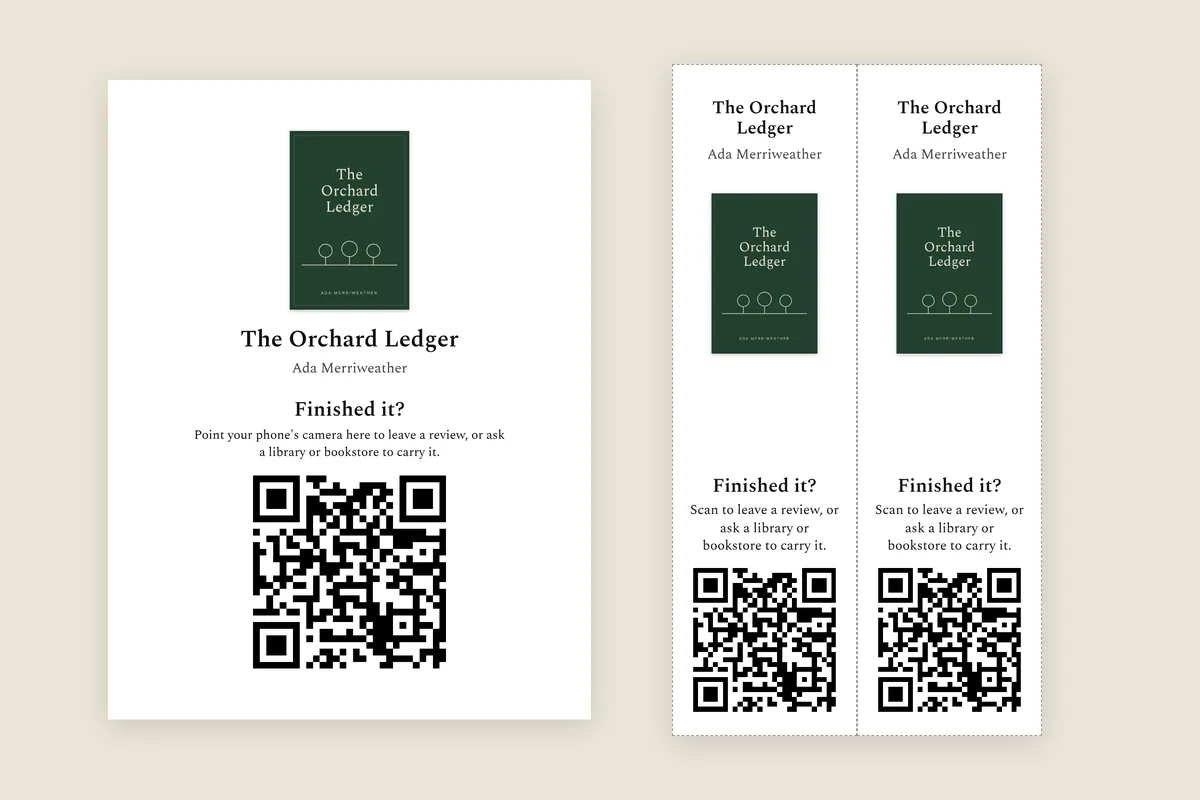
Ready to print. The QR code comes in two versions, for light and dark backgrounds, as files you can use in your own designs. There is also a table sign and a sheet of bookmarks, laid out and ready to print, like the ones above.
A link that stays the same. The code always opens your book’s page at postshop.live. If the book isn’t published yet, Relay Ready gives it a page and a QR code now, and when it is published, the same code opens its reader page.
Which piece worked. The sign, the bookmarks and the links you text each carry their own tag. With paid Relay, your dashboard shows which of them brought readers, and what those readers did.
Relay is free for one book. You can see how it works at postshop.live/relay, or start free.
A QR code takes up an inch of paper. What it opens decides whether a reader who loved the book does something about it that night, or means to, and never does.
More guides
References
- Apple Support — “Scan a QR code with your iPhone or iPad”: the Camera app or Code Scanner reads QR codes without a separate app.
- Uniqode — “QR Code Printing Guideline”: a minimum of about 2 × 2 cm, the 10:1 scanning-distance rule, and vector files for print.
- QRcode.com, Denso Wave — the QR code’s maker on symbol size: “QR Code requires a four-module wide margin at all sides of a symbol.”
Figures and rules are cited as published by their sources. Where a source has updated them since, the source is authoritative and this page is not.